
Searching the Hopkins County Court Docket
Start your Hopkins County court docket search at the official Hopkins County District Court Dockets page. The clerk posts it under the heading “Cases Set By Court.” It lists three separate courts. They are County Court at Law, 8th District Court, and 62nd District Court. Each link opens its own Easydocs view. There is no single countywide database behind them. The three views were checked on September 3, 2026. None returned a usable response, so the fields they display today cannot be promised.
Bring the strongest identifier you have. A cause number works best. Other details can also narrow things down. Try a party name, court, rough year, hearing date, or citation number. If a view will not load, go back to the county page and contact the clerk. A failed web request does not mean the Hopkins County courthouse lacks a current docket.
- Identify the case type and likely court level.
- Choose the matching court link from the official county hub.
- Search narrowly by cause number if the live system permits it.
- Record the court, case style, entries, status, and next setting.
- Ask the clerk for the exact filed document or certified copy when needed.
Hopkins County Docket Starting Point
The county's own docket hub lists each court as a separate choice. Open the county source shown in the image to reach the court links yourself.
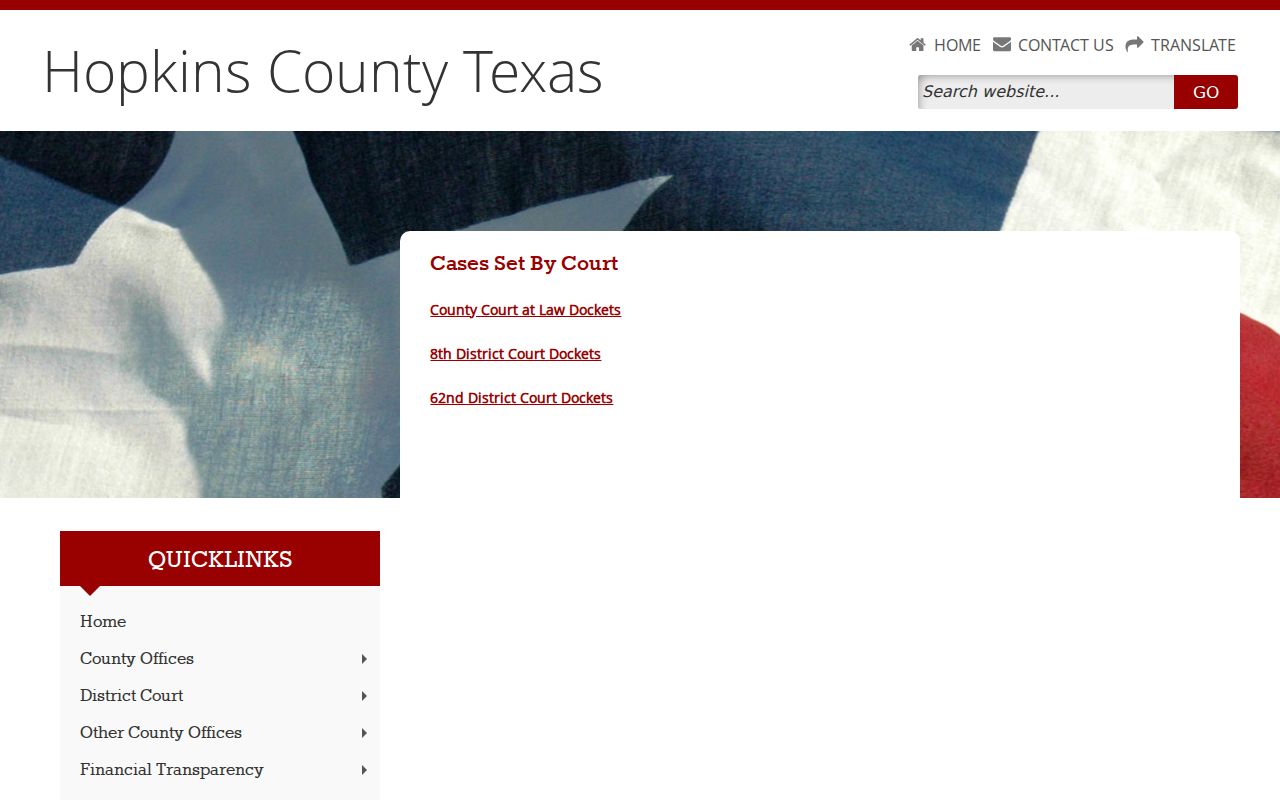
The Hopkins County page shows separate links. They cover County Court at Law, 8th District Court, and 62nd District Court. What it does not show is any private case result. It cannot prove those views are online now.
That distinction heads off two common mistakes. Do not treat the County Clerk’s land-record link as a universal court docket. And do not mistake a payment page for a full case file. Start with the named court. Then request the exact record from the office that keeps it.
Inside a Hopkins County Court Docket
A Hopkins County court docket is a case's chronological index. It can show the court and cause number. It also shows the case style, filings and service, settings, and any orders or final disposition. How much detail is public depends on the court, the case type, integration, and access rules. The Easydocs field layout can shift. No single case-number pattern or screen control applies to every search.
| Court and cause number | The main routing details for later searches and clerk requests. |
|---|---|
| Style or caption | The public title that distinguishes cases with similar names or numbers. |
| Filing or service entry | A dated procedural event, not necessarily a ruling. |
| Motion and order | A request and the court’s response are separate docket events. |
| Hearing setting | A date, time, place, judge, and setting type where public. |
| Disposition or judgment | An outcome indicator that should be checked against the signed document. |
| Document or access status | A link, copy process, redaction, seal, or restriction may apply. |
A docket entry is not the paper behind it. When legal effect matters, request the signed order or judgment itself. Ask for a certified copy only when an official certified reproduction is truly required.
Hopkins County Docket Office Split
Three offices in Sulphur Springs matter for docket business. The county courthouse sits at 118 Church Street. The District Clerk is at 282 Rosemont Street, Suite 2. The County Clerk is at 128 Jefferson Street, Suite C. Each address has a different job, so "the courthouse" alone will not route your request.
| Office | Main docket role | Public contact |
|---|---|---|
| District Clerk | District civil, family, and felony records | (903) 438-4081 |
| County Clerk | County-clerk, probate, and part of county-court routing | (903) 438-4074 |
| County Court at Law | Scheduling and court-specific procedure | (903) 438-4004 |
| Justice Courts | JP civil, traffic, and Class C matters | Precinct 1 or 2 office |
Who keeps the records? The County Court at Law page says both the District Clerk and County Clerk maintain them. Confirm the case type and cause number before you order a copy. Staff can walk you through procedure, fees, and routing. They cannot pick a legal strategy or predict a ruling.
Courts That Keep Dockets in Hopkins County
Texas splits its trial courts into district, county, justice, and municipal levels. Hopkins County fits the 8th and 62nd Judicial District Courts, a constitutional County Court, a County Court at Law, and two Justice Courts, plus municipal courts in Sulphur Springs and Cumby. Each court keeps its own records. Appeals and federal cases run through entirely different systems.
| Court | Docket covers | Where to search |
|---|---|---|
| 8th or 62nd District Court | District civil, family, felony, and assigned matters | County docket hub and District Clerk |
| County Court at Law | Civil, family, misdemeanor, probate, guardianship, mental-health, and assigned cases | Court page, District Clerk, or County Clerk |
| Justice Court Precinct 1 or 2 | Small claims, debt, eviction, repair remedy, traffic, and Class C cases | Named precinct office |
| Municipal court | City ordinance, traffic, and other Class C matters | Named city court or citation route |
| Federal Sherman Division | Federal civil and criminal cases | PACER or federal clerk |
A JP appeal can reach County Court at Law for a trial de novo under the local procedural route. State appeals then climb through the Texas Courts of Appeals and above. TAMES serves as the appellate search layer.
Hopkins Docket Search Has Layers
The county portal and Texas re:SearchTX answer different questions. County links divide the local courts by cases set. re:SearchTX is a registered statewide research layer with Cases, Filings, Text, and Hearings views in its official guide. It can help with participating civil and family integrations. It still does not replace the clerk's official file.
| Layer | Best use | Main limit |
|---|---|---|
| County docket hub | Select County Court at Law, 8th, or 62nd | Linked vendor views were unavailable during research |
| County public calendar | Find public events and Court Dockets category | Not confirmed as every case-level setting |
| re:SearchTX | Search participating cases, filings, and hearings | Registration and integration limits; criminal exclusion |
| Clerk-held file | Request docket, filed item, or certified copy | Fees, restrictions, and delivery method vary |
eFileTexas handles the filing side, while re:SearchTX is what you use to look cases up. Filing something electronically does not guarantee the public will see it. Sealing, redaction, confidentiality, court type, and update timing can all limit what appears.
How to Find Court Dates and Settings
The Hopkins County public calendar has a Court Dockets category. It offers print, download, iCal, and RSS controls. The district-court pages add their own docket and judge-calendar links. County Court at Law sets its own schedule. Justice Court and municipal dates differ. Confirm with the court named on your notice.
Write down the date, time, court, location, judge, case number, setting type, and status. A later reset, continuance, or cancellation can override what you first saw. The 2023 County Court at Law waiver procedure mentions Thursday 9:00 a.m. pretrial dockets. That dated document does not promise today's schedule.
When a setting truly matters, call the clerk with your cause number. The full Hopkins County court dates resource walks through each calendar and confirmation route.
Hopkins Court Calendar Is One Layer
Hopkins County posts its official public calendar online, and the county's public calendar page lists scheduled court-related events alongside other public notices.
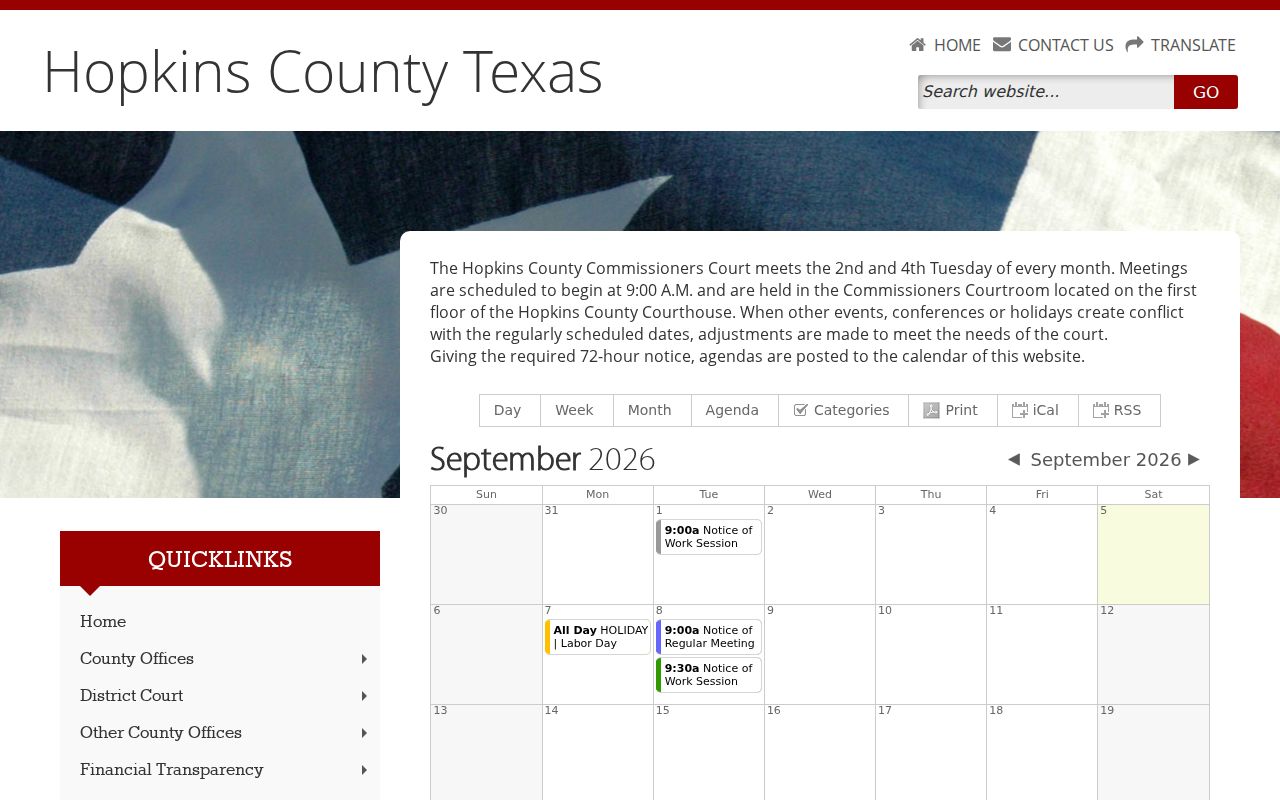
The calendar page supports its Court Dockets category and export controls. It cannot prove that every Hopkins County court docket event appears there. Nor can it promise a printed view stays current after a reset.
A calendar event is not the same as a docket sheet. A filed document is not a certified copy. Treat the calendar as a lead. Then confirm the current setting and how to appear with the named court. Old livestream references, likewise, do not guarantee a remote option today.
Public Access to Court Dockets
Texas treats its judiciary differently from ordinary county departments under the Texas Public Information Act. Judicial records get different treatment. Government Code section 552.0035 places access to judicial records under Supreme Court rules or other law. Rule 12 covers judicial records that are not case records. Hopkins County court dockets answer to their own rules. They also answer to statutes, redaction duties, and court orders.
Key rules:
Texas judicial open-records policy explains the judiciary exception and Rule 12 route.
Texas Rule of Civil Procedure 76a supplies the civil sealing standard and process.
Texas Family Code Chapter 58 protects covered juvenile records.
Code of Criminal Procedure Chapter 55A governs expunction.
A Hopkins County court docket may show a filing's title and date while the document behind it stays redacted or restricted. That is normal. If a clerk denies access, ask which rule, statute, protective order, or sealing order controls the file.
Hopkins Docket Access Has Boundaries
The words public, restricted, sealed, and redacted each mean something different. Public material is open to inspection under the court's process. Restricted material is limited by a rule or statute. A sealed item is withheld under a court order or other authority. Redaction simply removes protected data. The permitted part stays available for viewing.
- Docket entry
- A dated notation of a filing, event, order, setting, or outcome.
- Filed
- Accepted into the case file; it does not mean the judge granted the request.
- Setting
- A scheduled court event that may later move or be cancelled.
- Disposition
- A status or outcome entry that should be checked against the judgment.
- Certified copy
- A clerk-certified reproduction, distinct from a portal printout.
Hopkins County offers no local bulk docket API, automatic email alert promise, universal public terminal, or same-day copy guarantee. Ask the clerk about the current format, delivery, fee, and any restrictions.
Docket Records at the Clerk's Office
The Hopkins County District Clerk holds the district-court files. Cheryl Fulcher serves as District Clerk, and the office page links forms, fees, standing orders, assignments, and cases set by court. Call (903) 438-4087 for civil and family matters. Criminal questions go to (903) 438-4086 or (903) 438-4084.
Hopkins County District Clerk
282 Rosemont Street, Suite 2
Sulphur Springs, TX 75482
(903) 438-4081
dclerk@hopkinscountytx.org
Monday through Thursday, 8:00 a.m. to 5:00 p.m., with a noon closure; Friday, 8:00 a.m. to 4:00 p.m.
Confirm holiday or temporary hours before you drive over. For County Court at Law files, ask whether the District Clerk or County Clerk holds the record you need. When you request a docket entry or copy, give the court, cause number, case style if known, date range, and document name. Say whether you want a plain or certified copy.
Hopkins Justice Dockets by Numbers
The Texas Office of Court Administration reports Justice Court activity for the fiscal year from September 1, 2024 through August 31, 2025. Hopkins County opened that period with 4,868 active pending civil and criminal matters in the displayed total. The courts added 3,215, disposed of 3,476, and placed 552 inactive. They ended with 4,755 active pending. Another 783 matters were reactivated along the way.
These figures count report activity only. They are not unique residents, current open cases, or anyone's outcome. District and County Court at Law PDF rows are left out here because column extraction risked shifting the data.
Hopkins Dockets Span Two Eras
Today's access system sits beside a much older courthouse story. The Texas Historical Commission records that the 1882 courthouse burned on February 11, 1894. James Riely Gordon designed its replacement. It was finished in 1895 with red granite, sandstone trim, broad porches, and a tower. The building later saw extensive restoration completed in December 2002.
Modern records run on many layers. These include clerk counters, court-specific vendor links, calendar feeds, eFileTexas, re:SearchTX, and PACER. Those layers do not update together. The county can publish a setting. A vendor page may be down at the same time. Meanwhile, the clerk can hold a document that never shows online. The old courthouse is part of local court identity. But custody of any Hopkins County court docket follows the office and system assigned to the case.
Federal cases take another route entirely. Hopkins County sits in the Eastern District of Texas. Its Sherman Division offers federal docket access through PACER and CM/ECF. Searching a Texas county docket will not surface a federal case.
Hopkins County Court Dockets by City
Hopkins County has four incorporated places, so the city list stops at four. Sulphur Springs and Cumby have municipal-court routes. Como appears in an OCA report row. It posts no current public municipal portal. Tira shows up in Census data as an incorporated town. Yet it has no current municipal docket layer. Whatever you find, follow the court printed on your citation or notice.
Sulphur Springs Docket Search
2024 OCA population: 16,891. The municipal court handles city ordinance and Class C matters.
Como Docket Search
2024 OCA population: 750. No current public municipal docket portal was located.
Cumby Docket Search
2024 OCA population: 715. The city offers a citation search and payment page.
Tira Docket Search
2020 Census population: 319. Confirm the named court through town, county, or Justice Court channels.
A city docket entry does not carry over to the county calendar, and neither one matches a statewide driving record. Each court keeps its own schedule, so confirm hearing dates and copies with the office where the case was filed.
Map and Directions to the Hopkins County District Clerk's Office
8th and 62nd Judicial District Court files are kept by the District Clerk at 282 Rosemont Street, Suite 2, in Sulphur Springs, not at the county courthouse on Church Street. The 8th District Court's courtroom is listed at 298 Rosemont, in the same immediate area of town, while the judge's administrative office sits with the County Court at Law at 118 Church Street. For a district case, go to Rosemont Street; for a County Court at Law matter, confirm with the District Clerk whether the file is held there or at the County Clerk's office instead.
Hopkins County District Clerk
282 Rosemont Street, Suite 2
Sulphur Springs, TX 75482
(903) 438-4081
Monday through Thursday, 8:00 a.m. to 5:00 p.m., with a noon closure; Friday, 8:00 a.m. to 4:00 p.m.
Plan around the noon closure Monday through Thursday and the early Friday close. No parking, security-screening, or public-terminal policy is published for this office, so call (903) 438-4081 to confirm access before a visit.